

Implementing document automation in your financial operations helps you eliminate manual paper trails by switching to secure digital workflows. You’ll save time, reduce errors, and speed up approval processes, all while enhancing security with tamper-proof digital signatures. This modernization not only streamlines compliance with standards like GDPR and HIPAA but also boosts your efficiency and professionalism. Keep exploring how these tools can reshape your organization’s approach to financial document management.
Key Takeaways
- Automates financial document workflows, reducing manual routing, printing, and mailing delays.
- Implements digital signatures for secure, legally compliant, and instant approval processes.
- Ensures audit trails and version control to meet regulatory standards like Sarbanes-Oxley and GDPR.
- Lowers costs by eliminating paper, storage, and physical handling of financial documents.
- Enhances security and accuracy, minimizing errors and preventing tampering in financial operations.

Have you ever wondered how organizations streamline their document processes and save time? The answer often lies in the power of document automation. By shifting from manual paper trails to digital workflows, businesses can considerably boost efficiency, reduce errors, and accelerate decision-making. One of the key components in this transformation is the adoption of digital signatures. Unlike traditional ink signatures, digital signatures provide a secure, fast, and legally recognized way to sign documents electronically. They enable you to sign contracts, approvals, or financial statements instantly, no matter where you are. This not only speeds up transactions but also guarantees that documents are tamper-proof and authentic, which is critical in financial operations.
Implementing digital signatures is more than just convenience; it’s a strategic move to guarantee compliance standards are met effortlessly. Financial institutions and organizations dealing with sensitive data need to adhere to strict regulations such as the Sarbanes-Oxley Act, GDPR, or HIPAA. Document automation solutions often include built-in tools that help you stay compliant by enforcing audit trails, maintaining version control, and ensuring secure access. These features simplify the process of proving regulatory adherence, reducing the risk of costly penalties or legal issues. As you automate your document workflows, you gain a clear record of every action taken—who signed what and when—making compliance audits much smoother and less time-consuming.
Moreover, digital signatures integrate seamlessly into automated workflows, allowing you to send, sign, and approve documents all within a few clicks. This eradicates the delays caused by manual routing, printing, and mailing paper documents. With automation, approvals that once took days or weeks now happen in minutes, directly from your computer or mobile device. You also benefit from reduced paper costs and clutter, as digital documents are easier to store, search, and retrieve. The transition to automation not only speeds up your processes but also enhances security by reducing the risk of lost or forged signatures.
In addition, using digital signatures within your automated document processes helps foster a modern, professional image. Clients and partners appreciate the convenience and security of electronic transactions, which can improve relationships and trust. As compliance standards evolve, automation tools adapt quickly, ensuring that your organization remains ahead of regulatory requirements. Ultimately, integrating digital signatures into your document automation strategy transforms how you handle financial documents—making your operations faster, safer, and more compliant with industry standards.

Visualible Signature Pad E-Signature on Word, Excel, PowerPoint and PDF with Timestamp 6×4 Inch Writing Area with Battery-Free Stylus Pen Suitable for Windows
Support English: The software download for this pad is not only in Chinese, you can change it into…
As an affiliate, we earn on qualifying purchases.
As an affiliate, we earn on qualifying purchases.
Frequently Asked Questions
How Secure Is Automated Document Processing Against Cyber Threats?
You might wonder how secure automated document processing is against cyber threats. Rest assured, it employs robust cybersecurity protocols and data encryption to protect sensitive information. These measures safeguard your data from unauthorized access and cyberattacks. While no system is entirely invulnerable, integrating advanced security practices guarantees your automated processes stay protected, giving you confidence that your financial information remains confidential and secure against emerging threats.
Can Automation Integrate With Existing Legacy Financial Systems?
You might worry about legacy integration and system compatibility, but automation can seamlessly connect with your existing financial systems. Modern automation tools are designed to work with various legacy platforms, ensuring smooth data flow and minimal disruption. This compatibility helps you upgrade processes without overhauling your entire infrastructure, saving time and costs. Embracing automation means you get efficient, integrated workflows that enhance your financial operations without sacrificing your current systems.
What Are the Initial Costs of Implementing Document Automation?
When considering the initial costs of implementing document automation, you should perform a thorough cost analysis to understand startup expenses like software licensing, integration, and training. While upfront costs vary, focusing on ROI estimation helps you evaluate long-term savings and efficiency gains. Investing now can streamline your processes, reduce manual errors, and provide measurable benefits, making the initial investment worthwhile for your financial operations.
How Does Automation Handle Complex or Non-Standard Documents?
Imagine handling complex, non-standard documents with ease—automation makes this possible! You customize templates to fit unique needs and rely on exception handling to flag anomalies instantly. This system doesn’t just process standard files; it adapts dynamically, ensuring accuracy even with unpredictable data. With advanced algorithms, you streamline workflows, reduce errors, and stay agile, transforming formidable tasks into effortless, reliable processes.
What Training Is Required for Staff to Adapt to Automation Tools?
You need to focus on staff training and skill development to guarantee your team adapts well to automation tools. Start with thorough workshops that cover the basics and advanced features. Provide ongoing support and resources, like tutorials and help desks, to boost confidence. Encouraging continuous learning helps your staff stay updated, reduce errors, and maximize automation benefits, ultimately transforming your financial operations into more efficient, error-free processes.

AI Automation for QuickBooks Online: Unlock Powerful AI Features to Automate Tasks, Reduce Errors, and Boost Productivity
As an affiliate, we earn on qualifying purchases.
As an affiliate, we earn on qualifying purchases.
Conclusion
By automating your financial documents, you can reduce processing time by up to 80%, freeing up valuable resources and boosting accuracy. Imagine cutting down hours spent on manual paperwork and minimizing costly errors — it’s achievable with document automation. Embracing this technology not only streamlines your operations but also gives you a competitive edge. Don’t let manual paper trails hold you back; take control and transform your financial processes today.
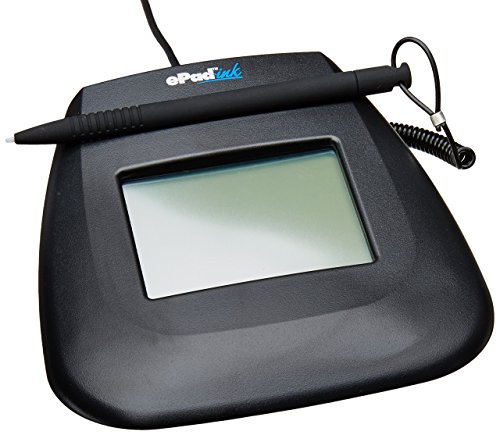
Interlink Electronics VP9805 Single Pack EPAD Ink/USB (Renewed)
Assigns a unique serial ID number to the host computer
As an affiliate, we earn on qualifying purchases.
As an affiliate, we earn on qualifying purchases.

Automated Workflow Scheduling in Self-Adaptive Clouds: Concepts, Algorithms and Methods (Computer Communications and Networks)
As an affiliate, we earn on qualifying purchases.
As an affiliate, we earn on qualifying purchases.