Portable wireless presentation remotes are easiest to compare by connection type, pointer style, control layout, and power source. I rank the Logitech Wireless Presenter R500s as the best overall pick because it balances familiar controls, broad usefulness, and travel-friendly simplicity. The Logitech Spotlight is the premium standout for digital highlighting and screen-based presentations, while the USB-A and USB-C model with volume control offers stronger value for mixed-port laptops. The main tradeoffs are physical laser visibility versus digital tools, plug-and-play reliability versus advanced control, and replaceable batteries versus USB charging. Continue reading for the full breakdown and the clearest match for each presenting style.

Get business pricing on office and shipping supplies
- Business-only prices and quantity discounts
- Tax-exempt purchasing
- Multiple users, one account, clear invoices
Key Takeaways
- The Logitech R500s offers the best overall balance: it is more approachable than the Spotlight but more polished than the many generic USB clickers.
- USB-A and USB-C support is the strongest value differentiator among the lower-cost models because it reduces dependence on a separate adapter.
- The Logitech Spotlight earns its premium role through digital presentation tools, not through basic slide advancement that cheaper remotes already handle.
- Specialized controls create narrower recommendations: the R800 suits laser-heavy presentations, the N95s adds timing support, and the DINOSTRIKE model targets cursor control.
- The two QUI remotes and several generic clickers overlap heavily, making button layout, receiver design, and stated software support more useful separators than feature count alone.
| Wireless Presentation Clicker for PowerPoint Presentations with Laser Pointer |  | Best for Straightforward Control | Maximum Range: 100 feet | Connectivity: USB | Button Quantity: 5 | VIEW LATEST PRICE | See Our Full Breakdown |
| Logitech Wireless Presenter R500s PowerPoint Clicker with Laser Pointer |  | Best Overall | Compatibility: Windows, macOS, iOS, Android, PowerPoint, Keynote, PDF, Google Slides, and Prezi | Maximum Range: 20 meters (65 feet) | Connectivity: USB receiver and Bluetooth Low Energy | VIEW LATEST PRICE | See Our Full Breakdown |
| Presentation Clicker with USB-A & USB-C Receiver, 2.4GHz Wireless Remote with Volume Control & Red Light Pointer |  | Best for Mixed USB Ports | Wireless Technology: 2.4GHz radio frequency | Receiver Ports: USB-A and USB-C | Maximum Supported Devices: Up to 10 | VIEW LATEST PRICE | See Our Full Breakdown |
| Logitech Spotlight Presentation Remote Wireless |  | Best Premium | Maximum Range: 30 meters (100 feet) | Estimated Battery Life: Up to 3 months per full charge | Quick Charging: 1 minute for up to 3 hours of use | VIEW LATEST PRICE | See Our Full Breakdown |
| QUI Presentation Clicker with Volume Control |  | Best Long-Range Pick | Connectivity: 2.4GHz wireless via USB receiver | Maximum Range: 328 feet | Button Quantity: 6 | VIEW LATEST PRICE | See Our Full Breakdown |
| Logitech Wireless Presenter R800 PowerPoint Clicker with Green Laser |  | Best for Large Venues | Laser color: Green | Wireless range: Up to 100 feet (30 meters) | Wireless frequency: 2.4 GHz | VIEW LATEST PRICE | See Our Full Breakdown |
| Ring-Style Wireless Presenter Remote with USB Receiver (USB-A/C) |  | Best Wearable Design | Design: Adjustable ring-style | Connectivity: Wireless | Receiver ports: USB-A and USB-C | VIEW LATEST PRICE | See Our Full Breakdown |
| DINOSTRIKE Wireless Presenter Remote with Air Mouse Control, Rechargeable USB PPT Clicker with RF 2.4GHz |  | Best for Cursor Control | Wireless frequency: 2.4 GHz RF | Presentation-control range: Up to 164 feet | Air-mouse range: Up to 82 feet | VIEW LATEST PRICE | See Our Full Breakdown |
| Lenovo Portable Rechargeable Presentation Remote Bluetooth 5.3 Wireless Clicker with Digital Pointer |  | Best for Frequent Travelers | Weight: 18.8 g | Connectivity: Bluetooth 5.3 | Wireless range: Up to 30 meters | VIEW LATEST PRICE | See Our Full Breakdown |
| Logitech Wireless Presenter R400 USB PowerPoint Clicker with Laser | 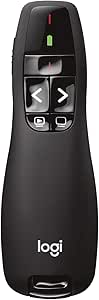 | Best Basic Controls | Connection: USB-A receiver | Wireless technology: 2.4 GHz RF | Wireless range: Up to 50 feet | VIEW LATEST PRICE | See Our Full Breakdown |
| QUI Presentation Clicker with Volume Control |  | Best for Long-Range Simplicity | Wireless range: Up to 328 ft | Wireless frequency: 2.4 GHz | Receiver connection: USB | VIEW LATEST PRICE | See Our Full Breakdown |
| 2 in 1 USB Type C Presentation Clicker |  | Best for Mixed USB Ports | Maximum range: 164 ft | Receiver connections: USB and Type-C | Button count: 5 | VIEW LATEST PRICE | See Our Full Breakdown |
| N95s Presentation Clicker with Digital Laser Pointer |  | Best Premium Presenter | Display: High-definition OLED | Connection types: USB-A, USB-C, and USB-A&C | Windows compatibility: Windows 10 | VIEW LATEST PRICE | See Our Full Breakdown |
| Wireless Presenter Remote with Hyperlink and Volume Control |  | Best Lightweight Cross-Platform Pick | Maximum range: 100 m | Supported systems: Windows, Mac OS, Linux, and Android | Supported presentation software: PowerPoint and Keynote | VIEW LATEST PRICE | See Our Full Breakdown |
| portable wireless presentation remote | Maximum Range |
|---|---|
| Wireless Presentation Clicker | 100 feet |
| Logitech Wireless Presenter R5 | 20 meters (65 feet) |
| Presentation Clicker with USB- | 20 meters |
| Logitech Spotlight Presentatio | 30 meters (100 feet) |
| QUI Presentation Clicker with | 328 feet |
| Logitech Wireless Presenter R8 | — |
| Ring-Style Wireless Presenter | — |
| DINOSTRIKE Wireless Presenter | — |
| Lenovo Portable Rechargeable P | — |
| Logitech Wireless Presenter R4 | — |
| QUI Presentation Clicker with | — |
| 2 in 1 USB Type C Presentation | 164 ft |
| N95s Presentation Clicker with | — |
| Wireless Presenter Remote with | 100 m |
More Details on Our Top Picks
Wireless Presentation Clicker for PowerPoint Presentations with Laser Pointer
I rank this as the straightforward five-button pick because its plug-and-play USB receiver and ergonomic body keep attention on the talk rather than setup. Its 100-foot control range reaches farther than the Logitech R500s’ 65 feet, making it better for presenters who walk around a classroom or meeting room. The trade is flexibility: unlike the R500s, it offers no Bluetooth connection or control-customization app, and it connects to only one computer at a time. Its roughly two-month AAA battery life also trails Logitech’s 12-month claim, so frequent travelers need a spare cell. I still favor this model over more elaborate remotes for buyers who want uncomplicated slide control. The red laser works best on conventional projector screens and loses visibility under bright lighting.
Pros:- Ergonomic shape suited to extended presentations
- 100-foot operating range provides ample room to move
- Plug-and-play USB setup requires no drivers
- Supports Windows, macOS, and Linux computers
Cons:- Two-month battery estimate is short beside the Logitech R500s
- Controls only one connected device
- Red laser can become difficult to see in bright rooms
Best for: Teachers and office presenters who want simple USB setup and enough range to move around a classroom or meeting room
Not ideal for: Multi-device presenters or frequent travelers who need Bluetooth and longer battery life
- Maximum Range:100 feet
- Connectivity:USB
- Button Quantity:5
- Controller Type:Button control
- Compatible Devices:Laptop and desktop computer
- Maximum Supported Devices:1
- Battery:1 AAA
- Estimated Battery Life:About 2 months
- Color:Dark gray
Our verdict“I recommend this model for presenters who value simple controls and long USB range more than Bluetooth or extended battery life.”
Logitech Wireless Presenter R500s PowerPoint Clicker with Laser Pointer
I rank the Logitech R500s first for its balanced mix of portability, compatibility, and connection choices. USB and Bluetooth Low Energy let a presenter move between conventional laptops, tablets, and USB-limited setups more easily than with the USB-only Wireless Presentation Clicker. Its claimed 12-month AAA battery life also makes it a better travel companion than that model’s two-month estimate. The 65-foot range is ample for most meeting rooms, although both the 100-foot basic clicker and Logitech Spotlight reach farther. Compared with Spotlight, the R500s lacks digital highlighting, magnification, and cursor control, but its simpler design suits conventional slide decks. Customization and battery monitoring rely on Logitech software, which may be unavailable on managed computers. I also would not choose its red laser for brightly lit displays, where visibility can fade.
Pros:- USB receiver and Bluetooth support provide flexible connection options
- Broad compatibility covers major operating systems and presentation apps
- Battery can last up to 12 months
- Customizable controls support different presentation workflows
Cons:- 65-foot range is shorter than several alternatives in the lineup
- Customization and monitoring depend on Logitech software
- Red laser visibility drops on bright screens
Best for: Consultants, trainers, and business travelers who regularly present from different computers or mobile devices
Not ideal for: Auditorium speakers needing more than 65 feet of range or digital on-screen highlighting
- Compatibility:Windows, macOS, iOS, Android, PowerPoint, Keynote, PDF, Google Slides, and Prezi
- Maximum Range:20 meters (65 feet)
- Connectivity:USB receiver and Bluetooth Low Energy
- Laser Pointer:Bright red laser
- Battery Type:1 AAA
- Estimated Battery Life:Up to 12 months
- App Support:Logitech Presentation App
Our verdict“I recommend the R500s as the best all-around choice for buyers who want dependable portability without paying for Spotlight-style digital tools.”
Presentation Clicker with USB-A & USB-C Receiver, 2.4GHz Wireless Remote with Volume Control & Red Light Pointer
I choose this as the mixed-port travel pick because its built-in USB-A and USB-C receiver can serve newer ultrabooks and older classroom computers without a separate adapter. That makes it more adaptable than the USB-only Wireless Presentation Clicker, while plug-and-play operation avoids the customization software associated with the Logitech R500s. Five-button navigation and volume control cover useful teaching and meeting functions, and the 50-gram body remains easy to carry. It is less flexible than the R500s when no USB port is available because it lacks Bluetooth. The supplied range data also conflicts: the technical maximum is 20 meters, while other copy references 100 feet. I would plan around the 20-meter rating. Two AAA batteries are required, neither is included, and there is no rechargeable alternative.
Pros:- Combined USB-A and USB-C receiver reduces adapter requirements
- Plug-and-play operation suits restricted workplace computers
- Volume controls add value for video and audio presentations
- Light 50-gram construction is easy to transport
Cons:- No Bluetooth connection for port-free devices
- Conflicting 20-meter and 100-foot range information creates uncertainty
- Requires two non-included AAA batteries and cannot be recharged
Best for: Traveling instructors and IT teams that move between USB-A and USB-C laptops and cannot rely on installed software
Not ideal for: Tablet presenters who need Bluetooth or buyers seeking a rechargeable remote with clearly documented range
- Wireless Technology:2.4GHz radio frequency
- Receiver Ports:USB-A and USB-C
- Maximum Supported Devices:Up to 10
- Maximum Range:20 meters
- Button Quantity:5
- Weight:0.05 kg
- Dimensions:5.31 x 1.65 x 0.95 inches
- Batteries:2 AAA, not included
- Color:Black
Our verdict“I recommend this clicker when broad USB compatibility matters more than Bluetooth, rechargeable power, or unambiguous range claims.”
Logitech Spotlight Presentation Remote Wireless
I place the Logitech Spotlight in the premium slot because its digital highlighting, magnification, and cursor control do more than advance slides. Those tools are better suited to detailed charts, large displays, and virtual sessions than the Logitech R500s’ conventional red laser. Spotlight also pairs a 100-foot range with USB-A and Bluetooth, giving speakers more room and connection flexibility than most basic clickers. Its rechargeable battery avoids carrying disposable AAAs, while one-minute quick charging can provide three hours of use before an unexpected presentation. That capability comes with software dependence: several advanced functions require Logi Options+, creating problems on older or locked-down computers. The missing weight and size figures also make portability harder to judge. I rank it below the R500s for basic decks, but above it for screen-focused visual control.
Pros:- Digital highlighting and magnification work beyond conventional laser pointing
- 100-foot range accommodates large rooms and stages
- USB-A and Bluetooth provide two connection paths
- One-minute quick charge supplies up to three hours of use
Cons:- Advanced functions depend on Logi Options+ software
- Older systems may not support the required app
- Missing size and weight data makes pocket portability difficult to compare
Best for: Executives, keynote speakers, and remote presenters who need digital highlighting and cursor control for visual-heavy decks
Not ideal for: Presenters using older or tightly managed computers that cannot run Logi Options+
- Maximum Range:30 meters (100 feet)
- Estimated Battery Life:Up to 3 months per full charge
- Quick Charging:1 minute for up to 3 hours of use
- Connectivity:USB-A receiver and Bluetooth Smart
- Compatibility:Windows, macOS, PowerPoint, Keynote, PDF, Google Slides, and Prezi
- Advanced Controls:Digital highlighting, magnification, and cursor control
Our verdict“I recommend Spotlight for polished, visual-heavy presentations where its digital tools justify added software dependence.”
QUI Presentation Clicker with Volume Control
I give the QUI Presentation Clicker the long-range role because its claimed 328-foot reach far exceeds the Logitech R500s’ 65 feet and suits lecture halls where a presenter may work far from the computer. Range is paired with a 24-gram body and carrying clip, so the remote remains easy to attach to a pocket or bag. Six buttons add volume control alongside slide navigation, and plug-and-play USB operation is convenient on shared teaching computers. Yet range alone does not make it my overall winner. Unlike the USB-A and USB-C Presentation Clicker, QUI provides USB-only connectivity; unlike the R500s, it has no Bluetooth fallback. It also supports one device at a time. The required AAA battery is not included, and no rechargeable option means ongoing battery replacements for frequent presenters.
Pros:- Claimed 328-foot range leads this five-product group
- 24-gram construction and clip support easy carrying
- Six-button layout includes useful volume control
- Plug-and-play operation requires no software installation
Cons:- USB-only connection lacks Bluetooth and native USB-C flexibility
- Controls only one device at a time
- AAA battery is not included and cannot be recharged in the remote
Best for: University lecturers, conference speakers, and venue staff who need an exceptionally long claimed range in large rooms
Not ideal for: USB-C-only or tablet presenters who need Bluetooth, multi-device switching, or rechargeable power
- Connectivity:2.4GHz wireless via USB receiver
- Maximum Range:328 feet
- Button Quantity:6
- Compatible Software and Devices:PowerPoint, Keynote, Google Slides, Excel, Prezi, whiteboards, and projectors
- Battery:1 AAA, not included
- Weight:24 g
- Carrying Feature:Integrated clip
- Color:Black
Our verdict“I recommend the QUI remote for large-room presenters who prioritize distance and low weight over connection flexibility.”
Logitech Wireless Presenter R800 PowerPoint Clicker with Green Laser
I rank the Logitech R800 as the large-room pick because its 100-foot range doubles that of the Logitech R400, while the green laser is easier to see in bright spaces than the R400’s red beam. The built-in timer and silent alerts also help speakers stay on schedule without checking a phone or wall clock. Those benefits make the R800 more presentation-focused than the DINOSTRIKE Air Mouse, which trades dedicated timing tools for cursor control. Portability remains good because the USB receiver stores inside the remote, though the legacy Windows XP and Vista compatibility listing creates uncertainty for buyers using current computers. It also relies on replaceable batteries rather than USB-C charging. I would choose this for conference rooms and lecture halls, but verify computer support before buying.
Pros:- Green laser remains easier to see than a typical red pointer in bright rooms
- 100-foot wireless range supports movement across lecture halls and conference spaces
- Timer display and silent alerts help speakers manage session length discreetly
- Stored USB receiver reduces the chance of losing the adapter during travel
Cons:- Listed compatibility covers only Windows XP and Windows Vista
- Replaceable batteries create ongoing cost and packing requirements
- Lacks the cursor control offered by the DINOSTRIKE Air Mouse
Best for: Conference speakers, lecturers, and trainers who need a visible laser and dependable control across a large room
Not ideal for: Mac users or buyers with current Windows hardware who need clearly documented modern operating-system support
- Laser color:Green
- Wireless range:Up to 100 feet (30 meters)
- Wireless frequency:2.4 GHz
- Receiver:Plug-and-play USB receiver with onboard storage
- Timer:Display with silent alerts
- Battery indicator:Yes
- Listed compatibility:Windows XP and Windows Vista
Our verdict“I recommend the R800 for large-room presenters who value timing tools and a visible green laser, provided their computer supports it.”
Ring-Style Wireless Presenter Remote with USB Receiver (USB-A/C)
The adjustable ring-style body gives this remote a distinct purpose: it stays on a finger, leaving the rest of the hand freer for gesturing or holding notes. I see that as a practical advantage over the larger Logitech R800, especially for mobile trainers who dislike gripping a conventional clicker throughout a session. Its dual USB-A and USB-C receiver also fits a wider mix of modern laptops than either the R800 or R400, and USB-C charging removes disposable-battery planning. Page controls, hyperlink activation, and a laser cover core presentation tasks without software installation. The tradeoff is specialization: unlike the DINOSTRIKE Air Mouse, this model cannot act as a general cursor controller. Ring fit may also feel less natural to speakers who frequently pass the remote to colleagues. It is the most gesture-friendly option here, not the most versatile.
Pros:- Adjustable ring design keeps the hand available for gestures or notes
- Dual USB-A and USB-C receiver supports both older and newer laptop ports
- Rechargeable battery avoids routine disposable-battery purchases
- Hyperlink control adds more flexibility than basic forward-and-back clickers
Cons:- Specialized controls cannot replace an air mouse or standard pointing device
- Ring-style handling may be awkward when several speakers share one remote
- Charging adds another pre-presentation task
Best for: Mobile trainers and expressive speakers who want slide controls attached to one finger and regularly switch between USB-A and USB-C laptops
Not ideal for: Shared presentation teams or buyers who want full cursor control beyond slide and hyperlink commands
- Design:Adjustable ring-style
- Connectivity:Wireless
- Receiver ports:USB-A and USB-C
- Battery:Built-in rechargeable battery
- Charging port:USB Type-C
- Slide controls:Page up and page down
- Additional controls:Laser pointer and hyperlink click
- Supported device types:USB-A and USB-C devices, including MacBook and ultrabooks
Our verdict“I would pick this for solo presenters who value hands-free-feeling control and broad port compatibility over mouse-like versatility.”
DINOSTRIKE Wireless Presenter Remote with Air Mouse Control, Rechargeable USB PPT Clicker with RF 2.4GHz
I would choose the DINOSTRIKE Wireless Presenter when slide advancement alone is too limiting. Its air-mouse function lets a speaker move a cursor from across the room, making it better suited to software demonstrations and interactive slides than the Logitech R400 or ring-style remote. The 164-foot control range is also the longest in this group, although air-mouse operation falls to 82 feet. A built-in receiver and compact body keep the kit travel-friendly, while the 300 mAh rechargeable battery avoids spare AAAs. That added capability brings a learning curve: sparse software instructions may leave some buyers working out mappings on their own, and a three-hour recharge demands advance planning. The red laser may also disappear against some displays or feel overly intense on certain backgrounds. I rank it as the versatility pick, rather than the simplest choice.
Pros:- Air-mouse mode supports cursor-driven demonstrations and interactive content
- 164-foot presentation-control range suits auditoriums and deep meeting rooms
- Rechargeable 300 mAh battery removes the need to carry disposable cells
- Compact body stores the USB receiver for easier travel
Cons:- Limited software guidance may make advanced controls harder to configure
- Three-hour charging time can be inconvenient before an unexpected presentation
- Air-mouse range is half the maximum presentation-control range
Best for: Software demonstrators and interactive presenters who need to manipulate an on-screen cursor from well beyond a lectern
Not ideal for: Speakers who want minimal controls, instant familiarity, and extensive setup guidance
- Wireless frequency:2.4 GHz RF
- Presentation-control range:Up to 164 feet
- Air-mouse range:Up to 82 feet
- Laser pointer:Bright red
- Battery capacity:300 mAh rechargeable
- Charging time:3 hours
Our verdict“I recommend the DINOSTRIKE to presenters who need remote cursor control and exceptional reach, not buyers seeking a basic slide advancer.”
Lenovo Portable Rechargeable Presentation Remote Bluetooth 5.3 Wireless Clicker with Digital Pointer
At just 18.8 grams, the Lenovo remote is my travel-focused choice for presenters who pack light and work from current laptops. It connects through Bluetooth 5.3, so there is no small receiver to misplace, unlike the Logitech R800 or DINOSTRIKE. Its digital pointer, magnifier, marker, and highlight modes can direct attention on modern displays where physical lasers may be hard to see. The 30-meter range still matches the R800’s reach, and a month of claimed battery life reduces charging pressure between trips. Flexibility depends on software, though: advanced customization requires the LADM app, and support is limited to Windows 10 or later and macOS 12 or later. It also needs a compatible Bluetooth setup, which makes a receiver-based model safer for unfamiliar venue computers. I favor it for personal laptop presentations, not shared AV stations.
Pros:- 18.8-gram body adds very little weight to a travel kit
- Digital pointer, highlight, magnify, and marker modes work well with screen-based presentations
- Bluetooth connection removes the risk of losing a USB receiver
- Rechargeable battery is rated for about one month of use
Cons:- Operating-system support excludes older Windows and macOS computers
- Advanced customization depends on installing the LADM app
- Bluetooth-only operation is less predictable on locked-down venue computers
Best for: Frequent business travelers who present from their own recent Windows or Mac laptop and prefer digital highlighting tools
Not ideal for: Venue-hopping speakers who must connect to unknown, older, or Bluetooth-restricted computers
- Weight:18.8 g
- Connectivity:Bluetooth 5.3
- Wireless range:Up to 30 meters
- Battery:135 mAh lithium-polymer rechargeable battery
- Charging:USB-C
- Battery life:About one month
- Pointer modes:Digital pointer, highlight, magnify, and marker
- Compatibility:Windows 10 or later and macOS 12 or later
- Customization:LADM app
Our verdict“I would buy the Lenovo for lightweight travel with a personal modern laptop, especially when digital highlighting matters more than universal connectivity.”
Logitech Wireless Presenter R400 USB PowerPoint Clicker with Laser
The Logitech R400 earns the straightforward-controls role because it focuses on slide movement and a red laser without app setup or secondary modes. I see it as a better fit for occasional presenters than the DINOSTRIKE Air Mouse, whose cursor functions add complexity, or the Lenovo remote, which depends on Bluetooth and software for its richer tools. The tactile layout helps a speaker operate it by feel, while the 50-foot range is ample for classrooms and standard meeting rooms. That simplicity comes with firm limits: its reach is half the Logitech R800’s, and the red laser is less visible in bright environments than the R800’s green pointer. It also uses replaceable AAA batteries and lists only Windows XP and Vista support, making compatibility checks necessary. This is my basic room-ready pick when uncomplicated operation matters most.
Pros:- Simple tactile controls are easy to operate without looking down
- Plug-and-play USB-A receiver requires no software setup
- 50-foot range is sufficient for most classrooms and meeting rooms
- Battery indicator reduces the risk of an unexpected power loss
Cons:- 50-foot range is much shorter than the R800 and DINOSTRIKE ranges
- Replaceable AAA batteries add recurring cost and travel clutter
- Listed compatibility is limited to Windows XP and Windows Vista
Best for: Occasional presenters in classrooms and standard meeting rooms who want tactile controls with no software setup
Not ideal for: Large-venue speakers, Mac users, or buyers who want rechargeable power and documented support for current operating systems
- Connection:USB-A receiver
- Wireless technology:2.4 GHz RF
- Wireless range:Up to 50 feet
- Laser pointer:Class 2 red laser
- Batteries:AAA
- Battery indicator:Yes
- Listed compatibility:Windows XP and Windows Vista
Our verdict“I recommend the R400 for straightforward presentations in modest rooms, but newer-device buyers should verify compatibility before choosing it.”
QUI Presentation Clicker with Volume Control
I rank the QUI Presentation Clicker with Volume Control as the straightforward long-range choice because its 328-foot reach gives a presenter room to move across lecture halls or conference stages, while plug-and-play USB operation keeps setup brief. Compared with the 2 in 1 USB Type C Presentation Clicker, it roughly doubles the stated control distance, but it lacks that model’s USB-C receiver flexibility. Page controls, hyperlinks, volume, and screen switching cover the functions I expect most speakers to need; the bright red pointer also helps direct attention at a distance. The tradeoff is a deliberately basic design: there is no timer, display, mouse control, or rechargeable battery like the N95s offers. I would choose it for dependable reach, not advanced presentation tools, and remember that the AAA battery is not included.
Pros:- 328-foot wireless range supports movement across large venues
- Plug-and-play operation requires no software installation
- Volume, hyperlink, slide, and screen controls cover common presentation tasks
- Broad compatibility includes PowerPoint, Keynote, Google Slides, Excel, and Prezi
Cons:- USB receiver lacks the USB-C flexibility offered by dual-connector models
- No timer, display, mouse control, or other advanced presenter tools
- Requires a separately purchased AAA battery and cannot be recharged
Best for: Teachers, trainers, and conference speakers who regularly present in large rooms and want simple controls with exceptional wireless reach
Not ideal for: USB-C-only laptop owners or frequent presenters who want a rechargeable remote, timer, display, or mouse control
- Wireless range:Up to 328 ft
- Wireless frequency:2.4 GHz
- Receiver connection:USB
- Operating systems:Mac OS and Windows
- Supported software:PowerPoint, Keynote, Google Slides, Excel, and Prezi
- Presentation controls:Page up/down, hyperlinks, volume, full screen, and black screen
- Pointer:Bright red light
- Power source:1 AAA battery, not included
Our verdict“I recommend this QUI remote to presenters who value maximum walking range and simple operation more than USB-C connectivity or advanced tools.”
2 in 1 USB Type C Presentation Clicker
I give the 2 in 1 USB Type C Presentation Clicker the connectivity-focused spot because its dual USB and Type-C receiver can move between older PCs and newer MacBooks or Surface devices without an adapter. That flexibility makes it easier to carry one remote between shared meeting rooms and classrooms. Its 164-foot range is ample for most halls, though the QUI Presentation Clicker with Volume Control reaches twice as far on paper. Five soft rubber buttons should also reduce distracting clicks during a talk. I see this as a practical middle ground rather than a feature-heavy choice: it lacks the OLED screen, countdown alerts, and digital pointer supplied by the N95s. The replaceable AAA power also trails rechargeable models for frequent use, while the stated TV and LCD incompatibility limits its appeal for direct screen-control setups.
Pros:- Dual USB and Type-C receiver works across old and new laptop ports
- 164-foot control range suits classrooms, meeting rooms, and many auditoriums
- Soft rubber buttons support quieter slide changes
- Works with laptops, MacBooks, Surface Pro devices, and PCs
Cons:- Stated as incompatible with TV and LCD screens
- AAA battery requires recurring replacement
- Five-button layout offers fewer advanced tools than the N95s
Best for: Teachers, office teams, and traveling speakers who alternate between USB-A and USB-C laptops
Not ideal for: Presenters who need direct TV or LCD compatibility, a rechargeable battery, or timer and pointer customization
- Maximum range:164 ft
- Receiver connections:USB and Type-C
- Button count:5
- Button material:Soft rubber
- Supported devices:Laptop, MacBook, Surface Pro, and PC
- Compatibility:Multiple operating systems and presentation applications
- Power source:1 AAA alkaline battery
- Color:Red
Our verdict“I would pick this model when easy switching between USB-A and USB-C computers matters more than premium presenter functions.”
N95s Presentation Clicker with Digital Laser Pointer
I place the N95s Presentation Clicker at the premium end because it does more than advance slides. Its OLED display, countdown timer, and vibration alerts help a speaker manage time without repeatedly checking a laptop, while digital and virtual pointers offer more ways to direct an audience’s focus. Compared with the 2 in 1 USB Type C Presentation Clicker, it adds mouse control, on-device status information, and USB-C recharging while retaining USB-A and USB-C connection choices. That wider toolkit suits polished talks, and the lightweight body keeps it viable for travel. The extra capability brings extra friction: the virtual pointer requires full-screen mode, and supporting software may produce false antivirus warnings that require manual approval. I would also avoid assuming universal support beyond the listed systems. Its software dependency makes it less effortless than the QUI remote, but rechargeable power is better suited to frequent presenters.
Pros:- OLED display shows timer, signal, and battery information at a glance
- Countdown timer and vibration alerts support discreet pacing
- Digital pointer, virtual pointer, and mouse control expand audience interaction
- USB-C rechargeable design avoids disposable battery purchases
Cons:- Virtual pointer works only while the presentation is in full-screen mode
- Supporting software may trigger false antivirus alerts and require manual trust settings
- Compatibility is limited to the listed operating systems and versions
Best for: Professional speakers, trainers, and lecturers who want visible time management, vibration alerts, digital pointing, and mouse control
Not ideal for: Occasional presenters who want software-free simplicity or users running operating-system versions outside the stated compatibility list
- Display:High-definition OLED
- Connection types:USB-A, USB-C, and USB-A&C
- Windows compatibility:Windows 10
- macOS compatibility:macOS 10.15 or later
- Other systems:Android 5.0+, Linux UOS 20, and Kylin 10/11
- Power:Rechargeable via USB-C
- Presenter tools:Digital laser pointer, virtual pointer, timer, vibration alerts, and mouse control
- Material:ABS and PC mixture
- Output power:Less than 1 mW
Our verdict“I recommend the N95s to frequent presenters who will use its timing and digital-control tools enough to justify added software setup.”
Wireless Presenter Remote with Hyperlink and Volume Control
I choose the Wireless Presenter Remote with Hyperlink and Volume Control for speakers who need broad system support in a highly portable body. Its published 31-gram weight and slim dimensions make it easy to leave in a laptop sleeve, while Windows, Mac OS, Linux, and Android support goes beyond the Mac-and-Windows focus of the QUI Presentation Clicker with Volume Control. The 100-meter control range is effectively tied with that QUI model’s 328-foot claim, so both suit large teaching spaces and event venues. Hyperlink and volume functions provide more control than a basic slide advancer, but this remains simpler than the timer-equipped N95s. I would skip it for multi-device workflows because it connects to only one device at a time. Mac users may also face some setup, and the non-rechargeable AAA battery is not supplied.
Pros:- 31-gram body is easy to carry in a laptop sleeve or presentation bag
- 100-meter range supports large classrooms, halls, and event spaces
- Works across Windows, Mac OS, Linux, and Android
- Hyperlink and volume controls provide more flexibility than basic slide navigation
Cons:- Controls only one connected device at a time
- Mac users may need to complete a setup step
- Requires an AAA battery that is not included and offers no rechargeable option
Best for: Traveling educators and event speakers who use Windows, Mac, Linux, or Android devices and want a very light remote with venue-scale range
Not ideal for: Multi-device presenters or buyers who want rechargeable power, instant Mac setup, or built-in timing tools
- Maximum range:100 m
- Supported systems:Windows, Mac OS, Linux, and Android
- Supported presentation software:PowerPoint and Keynote
- Controls:Slide navigation, hyperlinks, and volume
- Pointer:Bright red laser
- Power source:1 AAA alkaline battery, not included
- Weight:31 g
- Dimensions:5.47 × 0.74 × 0.49 in
- Color:Black
Our verdict“I would choose this remote for lightweight travel and broad operating-system support, provided single-device use and replaceable batteries are acceptable.”
How We Picked
I ranked these remotes through the specific lens of portable presentation work, giving the most weight to dependable slide control, connection flexibility, pocket-friendly design, and an interface that can be understood without preparation. I also compared physical and digital pointer systems, since a laser aimed at a projection screen solves a different problem from an onscreen highlight used during video calls. Power source, receiver storage, supported operating systems, and access to volume, links, timers, or cursor movement shaped each product’s role.
The highest positions went to models with the broadest useful balance, while products with narrower strengths received roles tied to those strengths. I did not treat a longer feature list as an automatic advantage: air-mouse control, extra buttons, and digital effects can add friction for a speaker who only needs forward and back. Price was judged against practical gains, so dual-port receivers raised the value score, while premium pricing needed to deliver a different presenting workflow. I also marked down designs with likely travel compromises, including tiny receivers, crowded controls, limited platform support, or dependence on adapters.
Factors to Consider When Choosing Portable Wireless Presentation Remotes
I would choose a presentation remote by matching it to the room, computer, and presentation software rather than chasing the largest specification list. The biggest dividing lines are pointer technology, connection method, and the amount of control placed under one thumb. Those choices affect reliability and ease of use more than minor differences in claimed wireless range.
Choose a Pointer for the Display, Not Just the Room
I separate physical lasers from digital pointers because they interact with displays in different ways. A red laser is familiar and usually adequate on a conventional projection screen. A green laser can appear brighter in a large room, making the R800-style approach more suitable for lecture halls, though it may cost more. Digital pointers create an onscreen highlight, which makes them better for video calls and large flat-panel displays but can tie advanced functions to software or operating-system support. If I regularly switch between projected slides and remote meetings, I would favor a model that handles screen-based highlighting without making basic slide control cumbersome. My rule is simple: buy for the display the audience will actually watch.
Match the Receiver to Every Laptop You Carry
A remote can be compact yet inconvenient if its receiver does not fit the available port. USB-A receivers work well with many office and classroom computers, while modern thin laptops may offer only USB-C. A dual USB-A and USB-C receiver is a practical middle ground for presenters who borrow machines or move between venues. Bluetooth removes the receiver, but pairing policies, locked-down work computers, and forgotten device connections can introduce delays. I would also check whether the receiver stores inside the remote, since loose dongles are easy to misplace during travel. For a single known laptop, one connection standard is enough; for shared equipment, port flexibility deserves more weight.
Buy Only the Controls You Can Use Without Looking
Extra controls help only when their placement remains easy to remember under pressure. Forward and back buttons cover most talks and give beginners the shortest learning curve. Volume control and hyperlink access can save a trip to the keyboard during media-rich decks, but they also increase the chance of pressing the wrong key. Air-mouse movement is useful for software demonstrations, yet it demands more hand precision than a conventional clicker. I favor clear button separation and tactile landmarks over a crowded surface filled with functions. Speakers who lend their remote to colleagues should place simplicity ahead of customization.
Compare Rechargeable and Replaceable Power Honestly
Rechargeable remotes reduce disposable battery purchases, but they add one more device to charge before travel. USB-C charging is convenient when it shares a cable with a laptop or phone, while an older charging connector may require dedicated packing. Replaceable batteries suit occasional presenters because they can remain ready for long periods and can be swapped immediately. Frequent speakers may prefer a rechargeable design with a clear battery indicator, especially when digital pointer functions draw more power. I would avoid choosing solely by the word rechargeable; charging time, warning behavior, and usability while connected also matter. A spare battery is easy to carry, while a depleted sealed battery may end a session.
Treat Range Claims as Only Part of Reliability
Advertised range can sound decisive, but most conference rooms do not require extreme distance. I place more value on stable control from normal speaking positions, including from the side of a room or behind a lectern. Wireless interference, receiver placement, walls, and nearby equipment can all reduce real-world performance. A long-distance model makes more sense for lecture halls, stages, or trainers who walk among an audience. Build quality also matters because loose buttons and exposed receivers can undermine an otherwise capable travel remote. I would pay for extended range only when the venue layout demands it, then prioritize a secure receiver and predictable button response.
Frequently Asked Questions
Should I Choose a Physical Laser or a Digital Pointer?
I would choose a physical laser for projected slides in classrooms, meeting rooms, and lecture halls where the beam will be visible on the screen. A digital pointer is a better fit when the audience watches through screen sharing or on a large monitor, since the highlight becomes part of the displayed image. Digital tools may require supported software, permissions, or setup that a basic laser avoids. Physical lasers can be difficult to see on some bright flat-panel displays and do not appear in a shared video feed. For mixed in-person and remote work, digital highlighting offers broader audience visibility.
Is Bluetooth Better Than a USB Receiver for Travel?
Bluetooth is attractive because there is no dongle to lose and no laptop port is occupied. I would still choose a USB receiver for shared, managed, or unfamiliar computers because pairing may be blocked or may take extra time. A receiver also makes it easier to move the remote between machines without changing saved Bluetooth connections. Dual USB-A and USB-C support reduces the main receiver drawback for travelers carrying newer laptops. For one personal computer, Bluetooth can be cleaner; for venue computers, a plug-in receiver is usually more predictable.
Will These Remotes Work With Keynote and Google Slides as Well as PowerPoint?
Basic forward and back commands often behave like keyboard inputs, so they are usually the most portable functions across presentation apps. I would check explicit platform support before buying for Keynote, browser-based slides, or macOS, especially if the remote includes volume, links, timers, or digital highlighting. Those advanced commands may be mapped differently or may depend on companion software. Browser focus also matters: a clicker cannot advance a deck if another window is receiving the keystrokes. Buyers who switch apps frequently should prioritize simple standard controls and stated cross-platform support.
Are Rechargeable Presentation Remotes Better for Frequent Speakers?
A rechargeable model makes sense when the remote is used often enough to justify regular charging. USB-C models are especially convenient when they share cables with other travel gear. For occasional talks, replaceable batteries may be less troublesome because they retain charge while the remote sits in storage and can be replaced moments before a session. I would also think about recovery: a spare battery restores a basic clicker immediately, while a drained rechargeable unit needs a power source and time. Frequent speakers may prefer rechargeable power, but infrequent presenters may get better readiness from replaceable batteries.
Which Features Matter Most for Hybrid and Online Presentations?
For hybrid sessions, I would prioritize an onscreen digital pointer because remote viewers cannot see a laser aimed at the room’s projection surface. Cursor control can also help with live software demonstrations, though it adds complexity and requires steady movement. Volume buttons are useful when videos are part of the deck, while a timer helps speakers stay aligned with a fixed online agenda. Compatibility with the meeting computer matters more than extreme wireless range because the presenter usually stays near the workstation. The best hybrid remote combines visible screen-based cues with dependable basic slide controls.
Conclusion
For most buyers, I recommend the Logitech Wireless Presenter R500s as the best overall choice because it balances portability, familiar operation, and everyday versatility. The presentation clicker with a USB-A and USB-C receiver is my best-value pick for anyone who wants modern port support and volume control without premium pricing. The Logitech Spotlight is the premium recommendation for hybrid speakers and polished digital highlighting, while the Logitech R400 is the easier beginner choice for straightforward slide advancement. For large projected rooms, the R800 and its green laser make more sense than paying for digital effects. The Lenovo remote suits lightweight Bluetooth travel, the ring-style model favors maximum compactness, the N95s targets speakers who need a countdown timer, and the DINOSTRIKE model fits cursor-heavy demonstrations. I would choose the simplest remote that covers the intended display, laptop connection, and presentation style, since unused controls add bulk and opportunities for mistakes.
Halloween Picks

HOPOCO Halloween Pumpkin Fog Machine with 12 LED Colors & Remote Control

9 ft Halloween Inflatable Haunted Castle with Dragon and Ghost

ELAMAS 11ft Animatronic Flying Witch Halloween Decoration
As an affiliate, we earn on qualifying purchases.