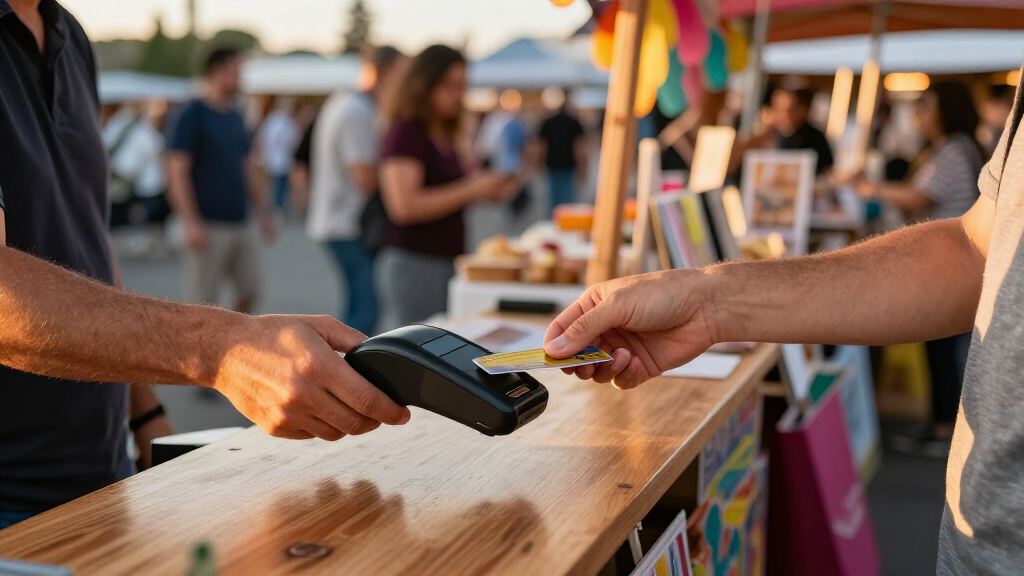
For many event sellers, the Square Reader for Contactless and Chip (2nd Generation) is the best overall choice because it pairs a compact format with contactless and chip acceptance, while the SumUp Solo with Charging Station suits vendors who want a standalone reader and a dedicated place to recharge. The Square Terminal is a stronger fit when you need a more complete payment station, while Square’s magstripe readers are narrower options for swipe-only use. The main tradeoffs are independence from a phone, the payment methods you can accept, and how much equipment you want to carry and manage. I’ve compared all seven for event-day usability, flexibility, and practical limitations. Read on for the full breakdown and a recommendation by event setup.

Get business pricing on office and shipping supplies
- Business-only prices and quantity discounts
- Tax-exempt purchasing
- Multiple users, one account, clear invoices
Key Takeaways
- Standalone operation separates the SumUp Solo, Square Terminal, and Square Handheld from phone-dependent readers: that can simplify checkout, but a larger device may take up more table or bag space.
- Contactless and chip acceptance makes the Square Reader for Contactless and Chip more flexible than either Square magstripe reader for a mixed crowd with different card habits.
- The SumUp Plus and Square contactless-and-chip reader are compact choices built around a smartphone connection; the phone remains part of the checkout setup, so plan for its battery and connectivity.
- The two Square magstripe readers address specific legacy needs, not broad payment acceptance: choose USB-C or Lightning based on your compatible device and skip them if swipe-only acceptance is too limiting.
- A more complete payment station is not automatically better for every event: the Square Terminal and Square Handheld may suit repeated, high-traffic selling, while lighter readers make more sense for short shifts and mobile booths.
| SumUp Solo Credit Card Reader with Charging Station | 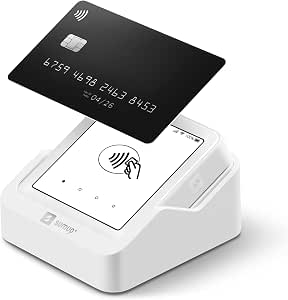 | Best for Events Without Reliable Wi-Fi | Brand: SumUp | Model: SumUp Solo | Connectivity: Wi-Fi and mobile data via included SIM card | VIEW LATEST PRICE | See Our Full Breakdown |
| Square Reader for Magstripe (USB-C) |  | Best for Lightweight, Phone-Based Setups | Brand: Square | Connectivity: USB Type-C | Compatible devices: Apple and Android devices with a USB Type-C connector | VIEW LATEST PRICE | See Our Full Breakdown |
| Square Terminal Mobile Credit Card Payment Machine |  | Best for Events That Need Printed Receipts | Dimensions: 5.6 × 3.4 × 2.5 inches | Weight: 14.7 ounces | Manufacturer: Square | VIEW LATEST PRICE | See Our Full Breakdown |
| SumUp Plus Bluetooth Card Reader for Smartphones |  | Best for Simple Smartphone Pairing | Connectivity: Bluetooth | Compatible devices: Smartphones and tablets | Operating systems: iOS, Android | VIEW LATEST PRICE | See Our Full Breakdown |
| Square Reader for Contactless and Chip (2nd Generation) |  | Best for Flexible Contactless and Chip Payments | Compatible devices: Android, iPhone | Power source: Battery powered | Connectivity: Bluetooth | VIEW LATEST PRICE | See Our Full Breakdown |
| Square Handheld Portable POS and Credit Card Machine |  | Best for Tableside Service and Busy Events | Dimensions: 7.04 x 3.12 x 0.62 inches | Weight: 2.11 ounces | Manufacturer: Square | VIEW LATEST PRICE | See Our Full Breakdown |
| Square Reader for Magstripe with Lightning Connector |  | Best for Existing iPhone-Based Setups | Brand: Square | Model: A-SKU-0523 | Connectivity: Lightning connector | VIEW LATEST PRICE | See Our Full Breakdown |
| portable card readers for event | Connectivity | Compatible devices | Warranty | Weight |
|---|---|---|---|---|
| SumUp Solo Credit Card Reader | Wi-Fi and mobile data via included SIM card | Smartphones | 12 months | — |
| Square Reader for Magstripe | USB Type-C | Apple and Android devices with a USB Type-C connector | 1 year | 6.53 g |
| Square Terminal Mobile Credit | — | — | — | 14.7 ounces |
| SumUp Plus Bluetooth Card Read | Bluetooth | Smartphones and tablets | — | — |
| Square Reader for Contactless | Bluetooth | Android, iPhone | Limited 1-year | — |
| Square Handheld Portable POS a | Offline payments supported | — | — | 2.11 ounces |
| Square Reader for Magstripe wi | Lightning connector | Smartphones and iPads | 1-year limited | 2.08 ounces |
More Details on Our Top Picks
SumUp Solo Credit Card Reader with Charging Station
The SumUp Solo suits vendors who need a self-contained reader at outdoor markets or pop-ups where a venue’s Wi-Fi may be unreliable. Its included SIM card provides mobile data, while the touchscreen lets staff handle payments on the device rather than relying on a phone for every step. The charging station gives it a clear event-day home between transactions. Compared with the SumUp Plus Bluetooth Card Reader, the Solo is less dependent on a paired smartphone, but it is a larger, more dedicated setup. That independence comes with a setup task: registration through SumUp’s website or app is required. Choose it for mobile-data flexibility; skip it if you want the smallest, simplest reader to pair with a phone.
Pros:- Included SIM card and mobile data reduce reliance on event Wi-Fi.
- Touchscreen supports payment handling directly on the reader.
- Charging station provides a dedicated place to recharge between service periods.
- Designed for mobile businesses and outdoor events.
Cons:- Requires registration through the SumUp website or mobile app before setup.
- A dedicated reader and charging station are more to carry than a compact phone-connected option.
- The listed data does not specify battery runtime or offline payment support.
Best for: Market stallholders and pop-up vendors who need a dedicated touchscreen reader with mobile data when venue Wi-Fi is uncertain.
Not ideal for: Occasional sellers seeking a minimal phone-connected reader who would rather avoid account registration and a dedicated charging station.
- Brand:SumUp
- Model:SumUp Solo
- Connectivity:Wi-Fi and mobile data via included SIM card
- Display:OLED touchscreen
- Included accessory:Charging station
- Compatible devices:Smartphones
- Warranty:12 months
Our verdict“Choose the SumUp Solo if your event setup needs mobile data and a touchscreen reader; choose the SumUp Plus for a simpler phone-paired arrangement.”
Square Reader for Magstripe (USB-C)
For an event seller already carrying a compatible USB-C phone, this lightweight Square magstripe reader keeps the payment hardware simple and lets the Square Point of Sale app handle sales tracking, tips, and digital receipts. At just 6.53 g, it is easy to pack as a spare or use at a small counter. Its main limitation is the payment method: this reader is for magstripe transactions, unlike the Square Reader for Contactless and Chip, which accepts chip and contactless payments and can support offline payments for up to 24 hours. The USB-C connection also rules out devices without that port. It makes sense for sellers whose customers can pay by swipe and who value a light kit, but it is a narrower choice for busy events with varied payment preferences.
Pros:- Very low listed weight makes it easy to carry as event equipment or a backup.
- Connects to compatible Apple and Android devices through USB-C.
- Square Point of Sale app includes sales and inventory tracking, tips, and digital receipts.
- Can support payments at a counter or while moving around an event.
Cons:- Requires a compatible device with a USB-C connector.
- Magstripe-only capability is less versatile than the Square contactless-and-chip reader.
- The listed product data does not specify battery or offline payment capability.
Best for: Small event vendors with a USB-C iPhone or Android device who want a lightweight reader and Square’s sales, tips, and digital-receipt tools.
Not ideal for: Sellers who need chip or contactless acceptance, offline payment support, or compatibility with a device that lacks USB-C.
- Brand:Square
- Connectivity:USB Type-C
- Compatible devices:Apple and Android devices with a USB Type-C connector
- Operating systems:iOS, Android
- Weight:6.53 g
- Dimensions:4.5 × 0.62 × 4.5 in
- Warranty:1 year
Our verdict“Pick this reader for a light Square setup when swipe payments and USB-C compatibility fit your event; choose Square’s contactless-and-chip reader for broader payment options.”
Square Terminal Mobile Credit Card Payment Machine
The Square Terminal is the strongest fit here for sellers who want payment acceptance and receipt printing in one cordless device. Its rechargeable battery supports use away from a fixed counter, and the built-in printer can help at food stalls, service desks, or events where customers expect a paper receipt. Compared with the Square Reader for Contactless and Chip, the Terminal reduces reliance on a separate phone for the payment interaction, but its 14.7-ounce weight makes it less pocketable. It is also designed around Square services, so it is not the flexible pick for sellers who want to change payment platforms. Square lists all-day battery use without an exact duration; for a long event, plan around charging access rather than assuming a specific runtime.
Pros:- Prints receipts directly from the payment device.
- Built-in rechargeable battery supports cordless event use.
- Accepts major credit and debit cards.
- Includes 24/7 phone support and fraud-prevention features.
Cons:- At 14.7 ounces, it is heavier than compact phone-connected readers.
- Designed for use with Square services.
- Battery life is described as all day, but no exact runtime is provided.
Best for: Event operators who need a cordless payment terminal with on-device receipt printing, such as food vendors or staffed service counters.
Not ideal for: Solo sellers prioritizing the lightest carry kit, or businesses that do not want their payment setup tied to Square services.
- Dimensions:5.6 × 3.4 × 2.5 inches
- Weight:14.7 ounces
- Manufacturer:Square
- Battery:1 included lithium-ion battery
- Chip card processing:About 2 seconds
- Support:24/7 phone support
Our verdict“Choose the Square Terminal when printed receipts and a standalone cordless payment device matter more than minimizing what you carry.”
SumUp Plus Bluetooth Card Reader for Smartphones
The SumUp Plus is a straightforward choice for vendors who already plan to use an iOS or Android phone or tablet at their event. Bluetooth pairing and the free SumUp app let the mobile device serve as the hub, while the reader handles card acceptance. Compared with the SumUp Solo, it avoids a dedicated touchscreen-and-charging-station setup and is easier to fold into a phone-based kit. The tradeoff is dependence on that paired device, and the listed data gives no mobile-data connection or offline-payment capability to fall back on. The product information also states a 2.6% + 10 per-transaction fee, without specifying the currency for the fixed amount. This reader fits sellers comfortable with that arrangement; it is less suitable when standalone operation or documented connectivity backup is a priority.
Pros:- Bluetooth connects the reader to compatible smartphones and tablets.
- Works with the free SumUp app on iOS and Android.
- Supports major credit and debit cards.
- Phone-based setup avoids carrying a dedicated touchscreen terminal and charging station.
Cons:- Requires a compatible smartphone or tablet to take payments.
- The listed in-person fee is 2.6% + 10, with the currency for the fixed amount unspecified.
- Product data does not state mobile-data or offline-payment support.
Best for: Independent sellers who already use an iOS or Android phone or tablet and want Bluetooth card acceptance through the SumUp app.
Not ideal for: Vendors who need a standalone touchscreen terminal, mobile data built into the reader, or confirmed offline payment support.
- Connectivity:Bluetooth
- Compatible devices:Smartphones and tablets
- Operating systems:iOS, Android
- Color:White
- Item weight:142 g
- Transaction fee:2.6% + 10 per in-person transaction; currency for the fixed amount not specified
Our verdict“Choose the SumUp Plus for a phone-centered event setup; opt for the SumUp Solo if you want a dedicated touchscreen reader with included mobile data.”
Square Reader for Contactless and Chip (2nd Generation)
This Square contactless-and-chip reader covers more ways to pay than the Square magstripe reader: it accepts chip cards and contactless payments, including Apple Pay and Google Pay. That range can make checkout smoother when event customers arrive with different payment preferences. It pairs over Bluetooth with an iPhone or Android device, keeping the reader portable without making it a standalone terminal like the Square Terminal. Its stated offline payment support of up to 24 hours can help when connectivity drops, though it does not remove the need to manage transactions through a compatible device and Square setup. Compared with the SumUp Solo, it lacks the listed included mobile-data connection; compared with the magstripe-only Square option, it is the more versatile choice, but it is also heavier at 5.92 ounces.
Pros:- Accepts chip and contactless payments, including Apple Pay and Google Pay.
- Works with Android and iPhone devices over Bluetooth.
- Supports offline payments for up to 24 hours.
- Includes security and fraud-prevention features.
Cons:- Requires a compatible phone or other device for operation.
- At 5.92 ounces, it is heavier than the listed Square magstripe reader.
- Limited 1-year warranty.
Best for: Event sellers who want chip, contactless, Apple Pay, and Google Pay acceptance, plus offline payment support when a connection is interrupted.
Not ideal for: Vendors seeking a standalone terminal with a touchscreen and receipt printer, or those who cannot use a compatible iPhone or Android device.
- Compatible devices:Android, iPhone
- Power source:Battery powered
- Connectivity:Bluetooth
- Battery:1 included lithium-ion battery
- Item weight:5.92 ounces
- Offline payments:Up to 24 hours
- Warranty:Limited 1-year
Our verdict“Choose this Square reader for broad chip and contactless acceptance with a phone-based setup, but choose the Terminal if you need on-device receipt printing.”
Square Handheld Portable POS and Credit Card Machine
For event sellers who need more than a basic card reader, the Square Handheld combines payment acceptance with tableside ordering and barcode scanning. Its offline payment support can help keep transactions moving when venue connectivity falters, while the splash- and dust-resistant design suits crowded food stalls, pop-ups, and mobile service. Compared with the Square Reader for Magstripe with Lightning Connector, it is a more self-contained tool for managing a shift, rather than a reader that depends on a compatible iPhone or iPad. That broader role brings tradeoffs: the product details do not specify which payment methods it accepts, and a drop-protection case is optional. I’d choose it for event operators who value a handheld workflow and resilience over the simplicity of a phone-connected reader.
Pros:- Handheld design supports taking orders and payments around a venue
- Built-in barcode scanner adds a practical tool for scanning merchandise
- Offline payment support can help maintain service during connectivity interruptions
- Splash- and dust-resistant design is suited to busy event environments
Cons:- Protective case for accidental drops is optional
- The supplied product details do not identify supported payment methods
- A more capable handheld POS may be more than a simple, occasional-use setup needs
Best for: Food vendors and mobile event teams that take orders away from a fixed counter and may encounter weak connectivity
Not ideal for: Sellers who only need a basic reader for occasional payments, or who require confirmed drop protection without buying an optional case
- Dimensions:7.04 x 3.12 x 0.62 inches
- Weight:2.11 ounces
- Manufacturer:Square
- Connectivity:Offline payments supported
- Design:Splash- and dust-resistant
- Additional function:Built-in barcode scanner
- Date first available:May 13, 2025
- ASIN:B0F6HQK29Q
Our verdict“Choose the Square Handheld for mobile event service that benefits from ordering, scanning, and offline payment support in one device.”
Square Reader for Magstripe with Lightning Connector
This reader suits event sellers who already use a compatible iPhone or iPad and want a lightweight way to take magstripe payments. It connects through Lightning and works with Square point-of-sale apps; customers can tip and sign on the connected device, while compatible apps support receipts, discounts, and payment tracking. Compared with the Square Handheld, this is a narrower, phone-dependent option: it does not offer the described barcode scanner or offline payment capability, but it can fit a seller’s existing iOS setup without adding a separate handheld POS. The key limitation is payment method: it reads magstripe cards, so it may not suit events where attendees expect other ways to pay. I’d pick it for a simple counter or mobile station only after confirming device compatibility and that magstripe acceptance fits the audience.
Pros:- Lightweight reader connects directly to a compatible iPhone or iPad
- Accepts magstripe payments from Visa, Mastercard, Discover, and American Express
- Customers can tip and sign on the connected device
- Compatible apps support digital receipts, discounts, and payment tracking
Cons:- Requires a compatible iOS device and Square point-of-sale app
- Accepts magstripe payments only, which limits its fit for varied event payment preferences
- Payment processing and instant deposit fees may apply
Best for: Event sellers with a compatible Lightning-equipped iPhone or iPad who need magstripe acceptance and already use Square point-of-sale apps
Not ideal for: Vendors whose customers expect payment methods beyond magstripe, or sellers without a compatible iOS device and Square point-of-sale app
- Brand:Square
- Model:A-SKU-0523
- Connectivity:Lightning connector
- Compatible operating system:iOS 10.0.2 or later
- Compatible devices:Smartphones and iPads
- Color:White
- Weight:2.08 ounces
- Included items:One Square Reader for magstripe
- Warranty:1-year limited
Our verdict“Choose this reader for a compatible iOS-based event setup where magstripe payments are sufficient and a separate handheld POS is unnecessary.”

How We Picked
I ranked these readers around the demands of event checkout: how independently each device can operate, which payment methods it supports, how much equipment a seller must bring, and whether its form suits a fixed booth or a mobile setup. I also weighed everyday usability, charging and phone dependence, and the practical cost of choosing a narrow reader that may not suit every customer. A compact device only earns a high place if its payment options fit the job.
The ranking favors flexible acceptance and a manageable event setup over specialized swipe-only use. The Square Reader for Contactless and Chip takes the lead for its mix of portability and broader card acceptance; the SumUp Solo follows for sellers who value a standalone reader. The Terminal and Handheld rank as more complete options for sellers willing to carry a larger device, while the SumUp Plus is a phone-connected alternative. Both magstripe readers sit lower because their narrower acceptance makes them less adaptable for general event sales.
| portable card readers for event | Connectivity | Compatible devices |
|---|---|---|
| SumUp Solo Credit Card Reader | Wi-Fi and mobile data via included SIM card | Smartphones |
| Square Reader for Magstripe | USB Type-C | Apple and Android devices with a USB Type-C connector |
| Square Terminal Mobile Credit | — | — |
| SumUp Plus Bluetooth Card Read | Bluetooth | Smartphones and tablets |
| Square Reader for Contactless | Bluetooth | Android, iPhone |
| Square Handheld Portable POS a | Offline payments supported | — |
| Square Reader for Magstripe wi | Lightning connector | Smartphones and iPads |
Factors to Consider When Choosing Portable Card Readers For Events
Choosing a reader for an event is partly about the device and partly about the checkout plan around it. I’d match the reader to the crowd, the selling location, and the equipment you can reliably keep charged and connected—not just the size of the reader.
Match Payment Acceptance to Your Customers
Before buying, list the payment methods your customers are likely to present and check that the reader supports them. A device limited to magnetic-stripe swipes can be a poor fit for a busy event if attendees expect to tap or insert a card. Contactless and chip support gives a seller more ways to take cards, though it does not remove the need to confirm which payment types and services are supported in the seller’s region. Avoid choosing based only on a reader’s small size; a compact device that turns away common payment methods can slow checkout and lose sales. If you already know your event audience or have a required payment method, let that requirement narrow the shortlist first.
Decide Whether Your Phone Should Be Part of Checkout
Phone-connected readers can keep the hardware light, but they make your phone part of the payment station. That means the phone’s battery, app access, and connection become operational concerns alongside the reader itself. A standalone terminal can reduce that dependence, though it may add bulk and require its own charging routine. A common mistake is to compare reader size without counting the phone, cables, backup battery, or stand needed to make the setup work. For a one-person mobile booth, fewer separate pieces may matter more than the smallest reader alone.
Plan for Connectivity Before Event Day
Connectivity can vary between a staffed indoor venue and a crowded outdoor market, so check what connection method the device and its payment service require. Do not assume that “portable” means it will process payments without a dependable network. Ask the provider what happens during an outage and whether offline handling is available for your account, location, and payment type. If you cannot verify an acceptable fallback, arrange a reliable connection and have a backup payment plan. Test the full setup at the venue or in a similar environment before relying on it for a sales rush.
Balance Counter Space Against Checkout Volume
A small reader is easy to carry between stalls, but it may leave the seller arranging a separate phone or tablet at the counter. A larger terminal can put more of the checkout process in one place, which may help when sales happen continuously from a fixed booth. The tradeoff is extra weight, charging needs, and a larger footprint on a crowded table. Estimate how often you will move, how many people will be handling payments, and how much counter space you can spare. Buying the largest setup for a brief pop-up can add gear without improving the customer experience.
Check Device Compatibility and Charging Details
Connector choice matters most when a reader attaches to or charges through a particular phone or device. Confirm the exact connector and supported operating system for your current hardware rather than relying on a product name or an old accessory list. Also check what comes in the box and whether you need a separate cable, charging station, or compatible power source. Event days can run longer than expected, so plan how the reader and any companion phone will be charged between shifts. A backup cable or power bank can be more useful than carrying a second reader that does not match your setup.
Compare the Full Setup, Not Just the Reader
The reader is only one part of an event checkout system: payment processing terms, account requirements, receipts, inventory tools, and support can shape the day-to-day fit. Check current service terms directly with the provider, since availability and fees can vary by region and account. Think through whether you need a register-like workflow or just a way to take occasional card payments. A more capable device may be worthwhile for recurring events, while a simpler reader may be easier to store and manage for occasional sales. Choose for the workload you actually expect, and leave room for the setup to change if your event business grows.
Frequently Asked Questions
Can I use a portable card reader at an event without Wi-Fi?
It depends on the reader, payment service, account, and connection options available to you; portability alone does not mean payments work offline. Check the provider’s current rules for offline transactions, including which payment types qualify and what risks remain if a payment is later declined. If the venue has unreliable Wi-Fi, ask whether cellular service or a hotspot is supported and test that arrangement before the event. Keep a backup plan for interrupted service, such as directing customers to another accepted payment method. Do not rely on offline processing unless you have confirmed the exact terms for your setup.
Should I choose a standalone terminal or a reader that connects to my phone?
Choose based on how much you want your phone involved in each sale. A phone-connected reader can be smaller and easier to carry, but it depends on a compatible phone, its battery, and the required app. A standalone option can reduce the number of steps tied to your phone, while taking up more space and needing its own charging plan. For a roaming seller, portability may favor the smaller arrangement; for a fixed booth with frequent sales, a dedicated payment device may be simpler to manage. Count all the pieces in the setup before deciding which is truly lighter.
Is a magstripe-only reader enough for a market or festival?
It may work if swipe acceptance fits your customers and your payment provider’s current requirements, but it is a narrower choice than a reader that also accepts chip or contactless payments. At a mixed event, customers may expect to tap or insert rather than swipe, so limited acceptance can create delays or lost sales. Confirm the reader’s supported payment methods and regional availability before purchasing. If you already own a compatible device and only need a specific swipe option, a magstripe reader may still serve a focused purpose. For a general-purpose event setup, broader acceptance is usually the safer direction.
What should I bring to keep payments running through a long event?
Plan for power and connectivity across the entire selling period, not just the first few transactions. Bring the correct charging cable or station for the reader, and account for the phone or other device if your reader relies on one. A charged power bank can help, but check that it is suitable for your equipment and event rules. Confirm your network plan and know what you will do if service drops. A short pre-event check of battery levels, app access, and a test transaction can catch setup problems before customers arrive.
When does it make sense to pay for a more complete payment terminal?
A more complete terminal can make sense when you sell regularly, handle a steady line, or want fewer separate components at a fixed booth. It may reduce reliance on a phone and bring more of the payment workflow into one device. That added capability can be unnecessary for occasional events where a small reader and compatible phone cover the job. Compare the terminal’s footprint, charging needs, supported payment methods, and service requirements with your actual schedule. Paying for a larger setup is most defensible when it solves a repeated checkout problem rather than simply adding features.
Conclusion
For most event sellers, I’d start with the Square Reader for Contactless and Chip (2nd Generation) as the best overall balance of portability and payment flexibility. The Square Reader for Magstripe (USB-C) is the best value for a seller who specifically needs a compatible swipe reader and accepts its narrower use; it is not my pick for broad event acceptance. For a best premium, more complete setup, consider the Square Terminal if you want a dedicated payment station, or the Square Handheld if moving around matters more than minimizing equipment. Beginners who want a standalone device can favor the SumUp Solo with Charging Station, while those comfortable using a phone may prefer the simpler SumUp Plus. For specific needs, choose the Square magstripe reader with USB-C or Lightning only when its connector matches your device and swipe-only acceptance fits your customers. Check current compatibility and service terms before ordering, then pick the setup you can keep powered and connected through the event.